MapleStory Classic World Outfit Dyeing Guide
You can dye the same outfit item more than once. Each use consumes one Mystery Palette and rolls new colors from the item's original appearance.Nexon cash shop details
 Aurora Stamp
Exchange unequipped crate rewards
 Mystery Palette
5 stampsOne dye attempt
 Palette Cleanser
10 stampsOne reset
Which outfit items can you dye?
Look for the Aurora Badge on the item icon, then check the official list. The target must be a permanent Mystery Fashion Crate reward that has become untradeable through equipping or another eligible action.Nexon dyeable item list
- Permanent crate reward
 Dyeable item badge
- Already untradeable
All three conditions must be met. Special effects and parts of some weapons keep their original colors even after a Palette is used.Nexon cash shop details
Angel Halo and Slime T-Shirt are examples on the current official list. Hair and eye colors use their own color coupons.
How to dye an outfit item in four steps
1
 Right-click an unequipped reward and confirm the stamp exchange
Right-click an unwanted crate reward in your inventory. Check the item name in the dialog, then choose OK to receive 1 Aurora Stamp per item. An unopened Signature Style set can be exchanged for 2 stamps.
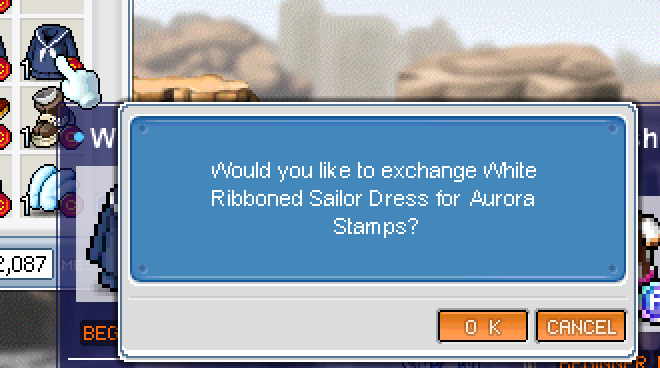
The confirmation dialog after right-clicking White Ribboned Sailor Dress. Choose Cancel to keep the item. 2
Double-click a stamp and exchange for a Palette couponOpen the Aurora Stamp Shop and select the Mystery Palette Exchange Coupon priced at 5 stamps.
3
Use the coupon to receive a Mystery PaletteEach Palette gives one random dye attempt. Another attempt needs another Palette.
4
 Equip the target once, then move it back to your inventory
Use the Mystery Palette on an eligible item in your inventory. Leave rewards you want to exchange for stamps unequipped; equip the item you want to dye once, then unequip it first.
You do not need five copies of the same outfit. The exchange requires 5 stamps; different eligible crate rewards can supply them.Nexon cash shop details
Can you dye the same item again?
Yes. Each new Mystery Palette rolls the item again from its original appearance, rather than stacking on the previous result. Every attempt consumes a new Palette.Nexon cash shop details
Colors are random. You cannot choose a target color, and the next result is not guaranteed to look different. Repeated attempts do not simply make the previous color darker.
Starlight Heart Scepter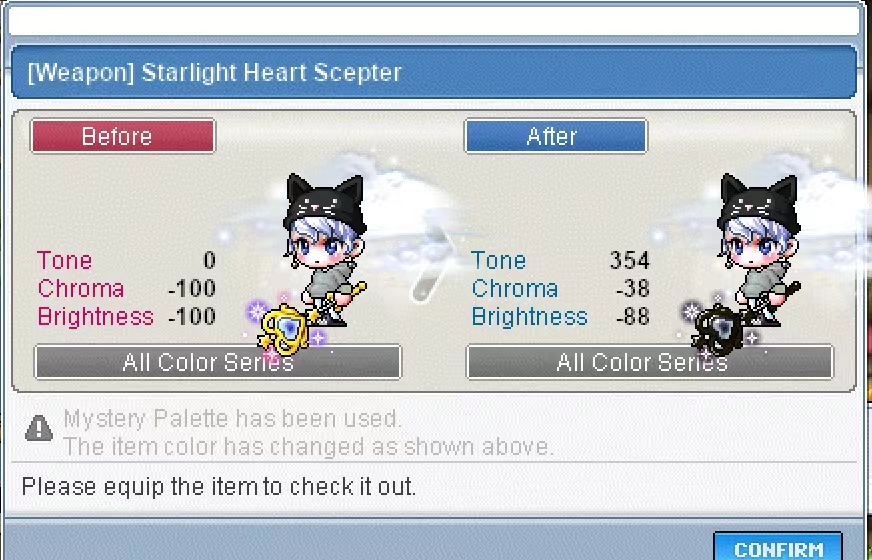
The dialog already says the Palette was used and the color changed. Confirm acknowledges the result. Do not treat Before as a button that lets you keep the old color.
How do resets and expiry dates work?
Use a Palette Cleanser to remove a Palette dye. The current shop exchanges 10 Aurora Stamps for one Palette Cleanser Exchange Coupon; the received item resets one dye. Resetting and rolling a new random color are different actions.Nexon cash shop details
Keep unused coupons and items separate from a dye already applied to an outfit. Check the actual expiry date shown in your game inventory.Nexon cash shop details
Compare colors in the outfit simulator first
If you are choosing a color scheme, select the item in the fitting room and compare colors with the rest of your outfit.
The simulator compares color schemes; it does not predict in-game random results. A color selected in the preview is not guaranteed to be obtainable from a Palette roll.